
AWS Elastic Load Balancer
Load Balancer distributes the web traffic to the available server.
Load balancer refers to efficiently distributing incoming traffic across a group of backend servers.
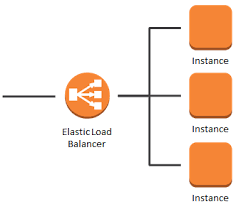
Type of Elastic Load balance:-
1- Application Load Balancer.
2- Network Load Balancer.
3- Classic Load Balancer.
Notes:- When target type is ip you can use only the following range CIDR.
10.0.0.0/8
100.64.0.0/10
172.16.0.0./12
192.168.0.0/16
-
An internet facing load balance has a publicly resolvable DNS name.
-
Domain name for content on the ec2 instances saved by the ELB , is resolved by the internet DNS server to the ELB DNS name .
-
This is how traffic from the internet is directed to the ELB front END.
-
Classic Load balancer service support:- HTTP, HTTPS, TCP, & SSL.
-
Protocol port supported are 1- 65535.
-
It supports IPv4, IPv6 & Dual stack.
-
Application load balancer distributes incoming application traffic across multiple targets such as EC2 instances in multiple AZ this increases the availability of your application.
-
Network load balancer has the ability to handle volatile workloads and scale to millions of requests per second.
Some important points of ELB Configuration…..
-
An ELB listener is the process that checks for connection requests.
-
You can configure the protocol port number on which your ELB listener listens for connection requests.
-
Frontend listeners check for traffic from client to the listener.
-
Backend listeners are configured with a protocol port to check for traffic from the ELB to the EC2 instance.
-
It may take some time for the registration of the EC2 instance under the ELB to complete.
-
Registered EC2 instances are those that are defined under the ELB.
-
ELB has nothing to do with the outbound traffic that is initiated / generated from the registered EC2 instance destined to the internet or any other instances within the VPC .
-
ELB only has to do with inbound traffic destined to the EC2 registered instance (as the destination) and the respective return traffic.
-
You start to be charged hourly (also for partial hours) once your ELB is active.
Some of the points of ELB Service…..
-
If you don't want to be charged as you do not need the ELB anymore you can delete it.
-
Before you delete ELB it is recommended that you point the route 53 to somewhere else other than the ELB.
-
Deleting the ELB does not affect or delete the EC2 instance registered with it.
-
ELB forwards traffic to eth0 of your registered instance.
-
In case the EC2 registered instance has multiple ip addresses on eth0, ELB will route the traffic to its primary ip address.
…..How Load Balancer finds Unhealthy instances…..
-
The load balancer also monitors the health of its registered instance and ensures that it routes traffic only to healthy instances.
-
Healthy instances show as Healthy under the ELB.
-
When The ELB detects an unhealthy instance it stops routing traffic to that instance.
-
An unhealthy instance is shown as “Unhealthy” under the ELB.
-
By default aws console uses ping http (port 80) for health check.
-
Registered instances must respond with a http 200 ok message within the timeout period, else it will be considered as “Unhealthy”.
-
AWS api uses ping TCP (port 80) for health checks .
-
Response time out is 5 seconds (Range is 2-60 s).
-
Health check interval.
-
Period of time between health checks .
-
Default 30 (Range 5 to 300 sec.).
Unhealthy Threshold:-
Number of consecutive failed health checks that should occur before the instance is declared unhealthy.
Range is 2-101 sec
Default - 2 s
Healthy Threshold:-
Number of consecutive successful health checks that must occur before the instance is considered unhealthy.
Range is 2-10 s
Default 10 s.
What is Listener and Target Group.
An ELB can be internet facing and internal ELB.ter
Internet Facing:-
-
ELB nodes will have a public IP Address.
-
DNS will restore the ELB DNS name to these ip addresses.
-
IT routes traffic to the private ip address of your registered ec2 instance.
-
You need one public subnet in each AZ where the internet facing ELB will be defined such that the ELB will be able to route internet traffic.
Format of the public ELB DNS name of internet facing ELB
name-123456780.region.elb.amazonaws.com
Format of the internal ELB.
Internal-name-123456780.region.elb.amazonaws.com
-
An ELB listener is the process that checks for connection requisition.
-
Each network load balancer needs at least one listener to accept traffic.
-
You must assign a security group to ELB that will control the traffic that can reach the ELB front end listener.
Target Group.
Logical grouping of targets behind the load balancer.
-
Target group can exist independently from the load balancer.
-
Target group can be associated with an auto scaling group.
-
Target group can contain up to 200 targets.