# ReactJS - Routing
In web application, Routing is a process of binding a web URL to a specific resource in the web application. In React, it is binding an URL to a component. React does not support routing natively as it is basically an user interface library. React community provides many third party component to handle routing in the React application. Let us learn React Router, a top choice [routing library](https://reactrouter.com/) for React application.
## Install React Router
Let us learn how to install *React Router* component in our Expense Manager application.
Open a command prompt and go to the root folder of our application.
```
cd /go/to/expense/manager
```
Install the react router using below command.
```
npm install react-router-dom --save
```
### Concept
React router provides four components to manage navigation in React application.
**Router** − Router is th top level component. It encloses the entire application.
**Link** − Similar to anchor tag in html. It sets the target url along with reference text.
```
Home
```
Here, **to** attribute is used to set the target url.
**Switch & Route** − Both are used together. Maps the target url to the component. **Switch** is the parent component and **Route** is the child component. **Switch** component can have multiple **Route** component and each **Route** component mapping a particular url to a component.
```
```
Here, **path** attribute is used to match the url. Basically, **Switch** works similar to traditional switch statement in a programming language. It matches the target url with each child route (**path** attribute) one by one in sequence and invoke the first matched route.
Along with router component, React router provides option to get set and get dynamic information from the url. For example, in an article website, the url may have article type attached to it and the article type needs to be dynamically extracted and has to be used to fetch the specific type of articles.
```
C Programming
Java Programming
...
...
} />
```
Then, in the child component (class component),
```
import { withRouter } from "react-router"
class ArticleList extends React.Component {
...
...
static getDerivedStateFromProps(props, state) {
let newState = {
tag: props.match.params.tag
}
return newState;
}
...
...
}
export default WithRouter(ArticleList)
```
Here, **WithRouter** enables **ArticleList** component to access the tag information through **props**.
The same can be done differently in functional components −
```
function ArticleList() {
let { tag } = useParams();
return (
ID: {id}
);
}
```
Here, **useParams** is a custom React Hooks provided by React Router component.
## Nested routing
React router supports nested routing as well. React router provides another React Hooks, **useRouteMatch()** to extract parent route information in nested routes.
```
function ArticleList() {
// get the parent url and the matched path
let { path, url } = useRouteMatch();
return (
Articles
C with pointer
C basics
Please select an article.
);
}
function Article() {
let { article } = useParams();
return (
The select article is {article}
);
}
```
Here, **useRouteMatch** returns the matched path and the target **url**. url can be used to create next level of links and **path** can be used to map next level of components / screens.
## Creating navigation
Let us learn how to do routing by creating the possible routing in our expense manager application. The minimum screens of the application are given below −
- **Home screen** − Landing or initial screen of the application
- **Expense list screen** − Shows the expense items in a tabular format
- **Expense add screen** − Add interface to add an expense item
First, create a new react application, *react-router-app* using *Create React App* or *Rollup* bundler by following instruction in *Creating a React application* chapter.
Next, open the application in your favorite editor.
Next, create *src* folder under the root directory of the application.
Next, create *components* folder under src folder.
Next, create a file, *Home.js* under *src/components* folder and start editing.
Next, import *React library*.
```
import React from 'react';
```
Next, import **Link** from React router library.
```
import { Link } from 'react-router-dom'
```
Next, create a class, Home and call constructor with **props**.
```
class Home extends React.Component {
constructor(props) {
super(props);
}
}
```
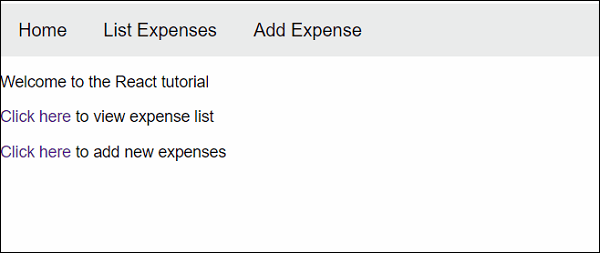
Next, add *render()* method and show the welcome message and links to add and list expense screen.
```
render() {
return (
Welcome to the React tutorial
Click here to view expense list
Click here to add new expenses
)
}
```
Finally, export the component.
```
export default Home;
```
The complete source code of the *Home* component is given below −
```
import React from 'react';
import { Link } from 'react-router-dom'
class Home extends React.Component {
constructor(props) {
super(props);
}
render() {
return (
Welcome to the React tutorial
Click here to view expense list
Click here to add new expenses
)
}
}
export default Home;
```
Next, create *ExpenseEntryItemList.js* file under *src/components* folder and create *ExpenseEntryItemList* component.
```
import React from 'react';
import { Link } from 'react-router-dom'
class ExpenseEntryItemList extends React.Component {
constructor(props) {
super(props);
}
render() {
return (
Expenses
Click here to add new expenses
Expense list
)
}
}
export default ExpenseEntryItemList;
```
Next, create *ExpenseEntryItemForm.js* file under *src/components* folder and create *ExpenseEntryItemForm* component.
```
import React from 'react';
import { Link } from 'react-router-dom'
class ExpenseEntryItemForm extends React.Component {
constructor(props) {
super(props);
}
render() {
return (
Add Expense item
Click here to view new expense list
Expense form
)
}
}
export default ExpenseEntryItemForm;
```
Next, create a file, *App.css* under *src/components* folder and add generic css styles.
```
html {
font-family: sans-serif;
}
a{
text-decoration: none;
}
p, li, a{
font-size: 14px;
}
nav ul {
width: 100%;
list-style-type: none;
margin: 0;
padding: 0;
overflow: hidden;
background-color: rgb(235,235,235);
}
nav li {
float: left;
}
nav li a {
display: block;
color: black;
text-align: center;
padding: 14px 16px;
text-decoration: none;
font-size: 16px;
}
nav li a:hover {
background-color: rgb(187, 202, 211);
}
```
Next, create a file, *App.js* under *src/components* folder and start editing. The purpose of the *App* component is to handle all the screen in one component. It will configure routing and enable navigation to all other components.
Next, import React library and other components.
```
import React from 'react';
import Home from './Home'
import ExpenseEntryItemList from './ExpenseEntryItemList'
import ExpenseEntryItemForm from './ExpenseEntryItemForm'
import './App.css'
```
Next, import React router components.
```
import {
BrowserRouter as Router,
Link,
Switch,
Route
} from 'react-router-dom'
```
Next, write the *render()* method and configure routing.
```
function App() {
return (
);
}
```
Next, create a file, *index.js* under the *src* folder and use *App* component.
```
import React from 'react';
import ReactDOM from 'react-dom';
import App from './components/App';
ReactDOM.render(
,
document.getElementById('root')
);
```
Finally, create a *public* folder under the root folder and create *index.html* file.
```
React router app
```
Next, serve the application using npm command.
```
npm start
```
Next, open the browser and enter *http://localhost:3000* in the address bar and press enter.
Try to navigate the links and confirm that the routing is working.