# Flask – SQLite
Python has an in-built support for **SQlite**. SQlite3 module is shipped with Python distribution. For a detailed tutorial on using SQLite database in Python, please refer to [this link](https://www.tutorialspoint.com/sqlite/sqlite_python.htm). In this section we shall see how a Flask application interacts with SQLite.
Create an SQLite database **‘database.db’** and create a students’ table in it.
```
import sqlite3
conn = sqlite3.connect('database.db')
print "Opened database successfully";
conn.execute('CREATE TABLE students (name TEXT, addr TEXT, city TEXT, pin TEXT)')
print "Table created successfully";
conn.close()
```
Our Flask application has three **View** functions.
First **new\_student()** function is bound to the URL rule **(‘/addnew’)**. It renders an HTML file containing student information form.
```
@app.route('/enternew')
def new_student():
return render_template('student.html')
```
The HTML script for **‘student.html’** is as follows −
```
```
As it can be seen, form data is posted to the **‘/addrec’** URL which binds the **addrec()** function.
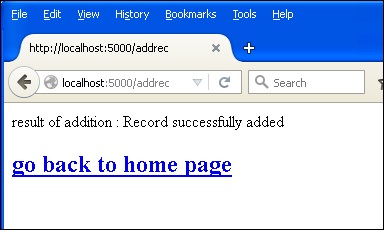
This **addrec()** function retrieves the form’s data by **POST** method and inserts in students table. Message corresponding to success or error in insert operation is rendered to **‘result.html’**.
```
@app.route('/addrec',methods = ['POST', 'GET'])
def addrec():
if request.method == 'POST':
try:
nm = request.form['nm']
addr = request.form['add']
city = request.form['city']
pin = request.form['pin']
with sql.connect("database.db") as con:
cur = con.cursor()
cur.execute("INSERT INTO students (name,addr,city,pin)
VALUES (?,?,?,?)",(nm,addr,city,pin) )
con.commit()
msg = "Record successfully added"
except:
con.rollback()
msg = "error in insert operation"
finally:
return render_template("result.html",msg = msg)
con.close()
```
The HTML script of **result.html** contains an escaping statement **{{msg}}** that displays the result of **Insert** operation.
```
result of addition : {{ msg }}
```
The application contains another **list()** function represented by **‘/list’** URL. It populates **‘rows’** as a **MultiDict** object containing all records in the students table. This object is passed to the **list.html** template.
```
@app.route('/list')
def list():
con = sql.connect("database.db")
con.row_factory = sql.Row
cur = con.cursor()
cur.execute("select * from students")
rows = cur.fetchall();
return render_template("list.html",rows = rows)
```
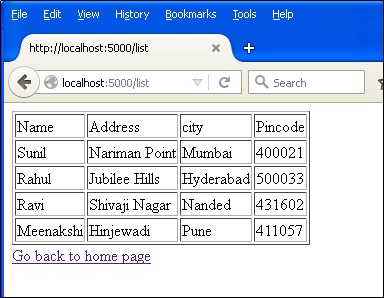
This **list.html** is a template, which iterates over the row set and renders the data in an HTML table.
```
| Name |
Address>/td<
| city |
Pincode |
{% for row in rows %}
| {{row["name"]}} |
{{row["addr"]}} |
{{ row["city"]}} |
{{row['pin']}} |
{% endfor %}
Go back to home page
```
Finally, the **‘/’** URL rule renders a **‘home.html’** which acts as the entry point of the application.
```
@app.route('/')
def home():
return render_template('home.html')
```
Here is the complete code of **Flask-SQLite** application.
```
from flask import Flask, render_template, request
import sqlite3 as sql
app = Flask(__name__)
@app.route('/')
def home():
return render_template('home.html')
@app.route('/enternew')
def new_student():
return render_template('student.html')
@app.route('/addrec',methods = ['POST', 'GET'])
def addrec():
if request.method == 'POST':
try:
nm = request.form['nm']
addr = request.form['add']
city = request.form['city']
pin = request.form['pin']
with sql.connect("database.db") as con:
cur = con.cursor()
cur.execute("INSERT INTO students (name,addr,city,pin)
VALUES (?,?,?,?)",(nm,addr,city,pin) )
con.commit()
msg = "Record successfully added"
except:
con.rollback()
msg = "error in insert operation"
finally:
return render_template("result.html",msg = msg)
con.close()
@app.route('/list')
def list():
con = sql.connect("database.db")
con.row_factory = sql.Row
cur = con.cursor()
cur.execute("select * from students")
rows = cur.fetchall();
return render_template("list.html",rows = rows)
if __name__ == '__main__':
app.run(debug = True)
```
Run this script from Python shell and as the development server starts running. Visit **http://localhost:5000/** in browser which displays a simple menu like this −
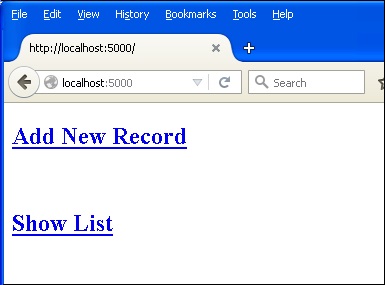
Click **‘Add New Record’** link to open the **Student Information** Form.
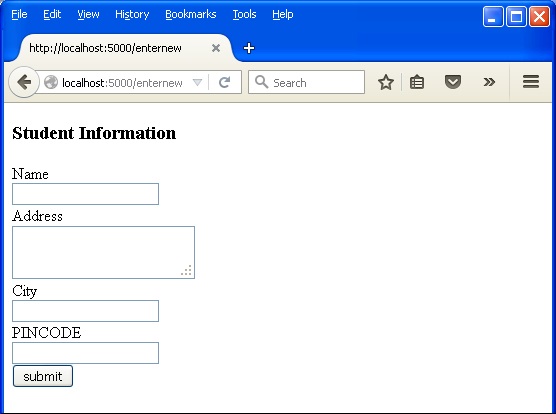
Fill the form fields and submit it. The underlying function inserts the record in the students table.
Go back to the home page and click **‘Show List’** link. The table showing the sample data will be displayed.