# Flask – Sending Form Data to Template
We have already seen that the http method can be specified in URL rule. The **Form** data received by the triggered function can collect it in the form of a dictionary object and forward it to a template to render it on a corresponding web page.
In the following example, **‘/’** URL renders a web page (student.html) which has a form. The data filled in it is posted to the **‘/result’** URL which triggers the **result()** function.
The **results()** function collects form data present in **request.form** in a dictionary object and sends it for rendering to **result.html**.
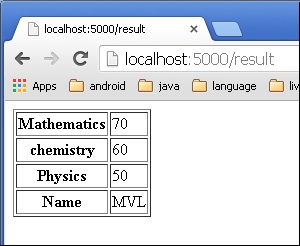
The template dynamically renders an HTML table of **form** data.
Given below is the Python code of application −
```
from flask import Flask, render_template, request
app = Flask(__name__)
@app.route('/')
def student():
return render_template('student.html')
@app.route('/result',methods = ['POST', 'GET'])
def result():
if request.method == 'POST':
result = request.form
return render_template("result.html",result = result)
if __name__ == '__main__':
app.run(debug = True)
```
Given below is the HTML script of **student.html**.
```
```
Code of template **(result.html)** is given below −
```
{% for key, value in result.items() %}
| {{ key }} |
{{ value }} |
{% endfor %}
```
Run the Python script and enter the URL **http://localhost:5000/** in the browser.
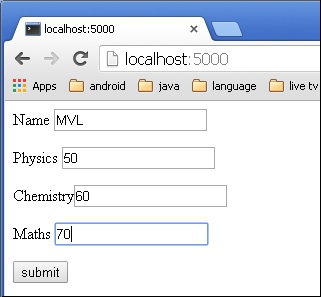
When the **Submit** button is clicked, form data is rendered on **result.html** in the form of HTML table.