# Flask – File Uploading
Handling file upload in Flask is very easy. It needs an HTML form with its enctype attribute set to ‘multipart/form-data’, posting the file to a URL. The URL handler fetches file from **request.files\[\]** object and saves it to the desired location.
Each uploaded file is first saved in a temporary location on the server, before it is actually saved to its ultimate location. Name of destination file can be hard-coded or can be obtained from filename property of **request.files\[file\]** object. However, it is recommended to obtain a secure version of it using the **secure\_filename()** function.
It is possible to define the path of default upload folder and maximum size of uploaded file in configuration settings of Flask object.
app.config\[‘UPLOAD\_FOLDER’\]
Defines path for upload folder
app.config\[‘MAX\_CONTENT\_PATH’\]
Specifies maximum size of file yo be uploaded – in bytes
The following code has **‘/upload’** URL rule that displays **‘upload.html’** from the templates folder, and **‘/upload-file’** URL rule that calls **uploader()** function handling upload process.
**‘upload.html’** has a file chooser button and a submit button.
```
```
You will see the screen as shown below.
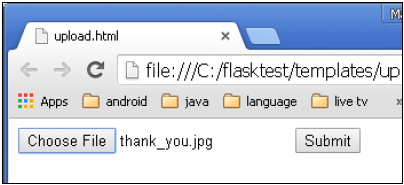
Click **Submit** after choosing file. Form’s post method invokes **‘/upload\_file’** URL. The underlying function **uploader()** does the save operation.
Following is the Python code of Flask application.
```
from flask import Flask, render_template, request
from werkzeug import secure_filename
app = Flask(__name__)
@app.route('/upload')
def upload_file():
return render_template('upload.html')
@app.route('/uploader', methods = ['GET', 'POST'])
def upload_file():
if request.method == 'POST':
f = request.files['file']
f.save(secure_filename(f.filename))
return 'file uploaded successfully'
if __name__ == '__main__':
app.run(debug = True)
```