Amazon Web Services - DynamoDB
Amazon DynamoDB is a fully managed NoSQL database service that allows to create database tables that can store and retrieve any amount of data. It automatically manages the data traffic of tables over multiple servers and maintains performance. It also relieves the customers from the burden of operating and scaling a distributed database. Hence, hardware provisioning, setup, configuration, replication, software patching, cluster scaling, etc. is managed by Amazon.
How to Run DynamoDB on Computer?
Following are the steps to set up DynamoDB.
Step 1 − Following are the steps to set up DynamoDB.
-
Download DynamoDB (.jar file) using the following link. It supports multiple Operating Systems like Windows, Linux, Mac, etc.
.tar.gz format − http://dynamodb-local.s3-website-us-west2.amazonaws.com/dynamodb_local_latest.tar.gz
.zip format − http://dynamodb-local.s3-website-us-west2.amazonaws.com/dynamodb_local_latest.zip.
-
Once download is complete, extract the contents and copy the extracted directory to a location wherever you want.
-
Open the command prompt and navigate to the directory where you extracted DynamoDBLocal.jar, and execute the following command −
java -Djava.library.path=./DynamoDBLocal_lib -jar DynamoDBLocal.jar -sharedDb
-
Now there is access to the build-in javaScript shell.
Step 2 − Create a Table using the following steps.
-
Open AWS Management Console and select DynamoDB.
-
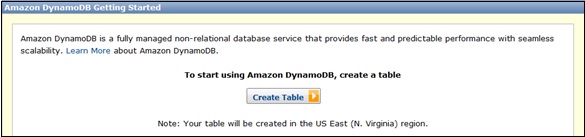
Select the region where the table will be created and click the Create Table button.
-
Create Table window opens. Fill the details into their respective fields and click the Continue button.
-
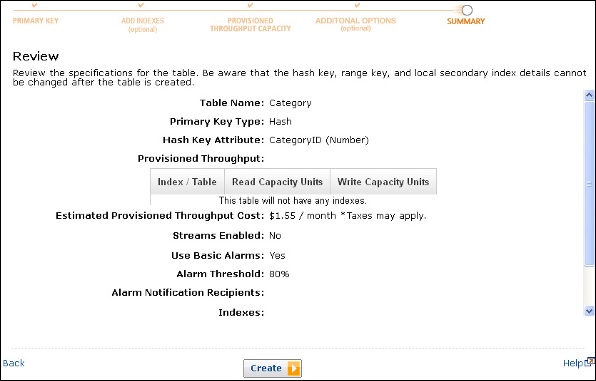
Finally, a review page opens where we can view details. Click the Create button.
-
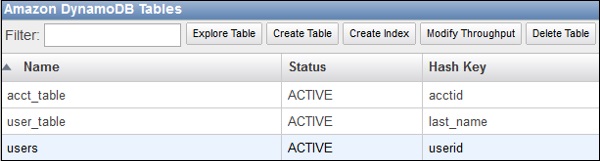
Now the Table-name is visible in the in-to the list and Dynamo Table is ready to use.
Benefits of Amazon DynamoDB
Managed service − Amazon DynamoDB is a managed service. There is no need to hire experts to manage NoSQL installation. Developers need not worry about setting up, configuring a distributed database cluster, managing ongoing cluster operations, etc. It handles all the complexities of scaling, partitions and re-partitions data over more machine resources to meet I/O performance requirements.
Scalable − Amazon DynamoDB is designed to scale. There is no need to worry about predefined limits to the amount of data each table can store. Any amount of data can be stored and retrieved. DynamoDB will spread automatically with the amount of data stored as the table grows.
Fast − Amazon DynamoDB provides high throughput at very low latency. As datasets grow, latencies remain stable due to the distributed nature of DynamoDB's data placement and request routing algorithms.
Durable and highly available − Amazon DynamoDB replicates data over at least 3 different data centers’ results. The system operates and serves data even under various failure conditions.
Flexible: Amazon DynamoDB allows creation of dynamic tables, i.e. the table can have any number of attributes, including multi-valued attributes.
Cost-effective: Payment is for what we use without any minimum charges. Its pricing structure is simple and easy to calculate.